Recording Techniques
If you live in awesome place with interesting ambience, why not go record them on your own and doubles as a break from staring at code editor as well?
Smartphones these day has very good microphones too. (Though the ads always only hype up about the cameras.) You have got many things covered.
There are just some gotchas I had experienced so far would like to tell you before you head out. Note that I have not received any formal education related to audio, these are pretty much random tips from an amateur.
Field recording is surprisingly accessible!
Despite how physically complex ambiences may sounds like, compared to BGM and SFX, it is more approachable to create them from scratch and include in your game even for people that aren't musically-minded.
In my opinion, you can tell a programmer that wasn't busy to go get some field recordings and have higher chance of success than telling him to compose music or make a clean sound effect.
As a hobby?
Right now you may go out to get sounds out of necessity for your game. But may I describe the fun of it as a hobby as well? Most people may understand about photography why it would be fun, we see plenty of people enjoy taking photos at scenic places or cafe. But field recording is unfortunately currently much more niche and hard to depict the appeal.
- The audio captured from stereo mics doesn't sound exactly like from your ears. Maybe we could say it is incomplete as the capture polar pattern is narrower than your ear and sense of direction is changed. But at the same time it is "new", the mic is sensitive to different frequencies compared to your ears. New world awaits you when you put on your headphone with your recorder on stand-by monitoring mode. Now you can also turn and twist your ear around or make your ear float in mid-air with a tripod.
- You go to new places in different sense from others. Though photographers can definitely go to difficult places to get new perspective, tourism and photographing have more overlaps than with recording sounds. Less people want to go to seemingly uninteresting corner that isn't photographic vantage point. While others are on top of waterfall, I hang around near rock crevices that happened to make weird sounds like my sink at home. You can relax in many more places not so visually interesting to enjoying the sounds as well.
- Photograph could be enjoyed by looking at it. Recordings can be listened to. Honestly, listening feels more cumbersome and it is more unlikely that I will come back and enjoy them like sifting through old photos. But in exchange their "usage" is more flexible. Use them to fill in your video projects, to cut out some interesting sound effects, or use in interactive media like games with Tiny Ambience. In this sense, photograph has less "utility". When I go out and record something, I get a sense of capturing something useful rather than for enjoyment. It is an another kind of fun.
- Many enjoy the process of editing photo to make it better or make it completely unbelievable in post-processing software. Audio also has this kind of challenge waiting for you. You can try cut out clean sound of creatures from your recordings, or try to make a loopable section for games. It is quite a challenge to make a recording time-insensitive. A single bird can render the file useless for night scenes.
- Enjoy heightened audio awareness. The same as when experienced photographers can notice subtler beauty in day to day life, you will gain new power to be attentive to sounds. Can you remember the sound of trip you went to as opposed to the visuals? Search engine can always find images of places but the sounds not so easily. Lately I was able to tell when insects at night elsewhere is the same or not the same as in my home, or containing a subset of insects around my home! Although it can make you more easily annoyed by unpleasant noises.
Maybe it will turn into your regular activities just like taking a dedicated camera when you are going on a trip with your friends.
Easier made than found
I see the ambiences inversed from music and SFXs in this perspective : While you can search the net for SFXs and buy/commission BGMs, an exact ambience you pictured in your head maybe difficult to find online (already difficult thinking about keywords to search for) but you may got inspired from real world around you.
You will spend hours auditioning free ambiences from the net and hope that they are exactly what you imagined. They will likely require heavy editing.
Even if you managed to find one, what about licenses? What is the scope that you can do with that sound? Imagine how paranoid you would be as the audio is getting baked deep inside the game ready for release.
At this point if you just went out and record it on your own in the first place the job may already been done!
Stay safe
First of all please do not risk injuring yourself. Microphone can pick things up better than you thought, getting close to dangerous place isn't worth it. There are all sorts of danger in this world but I shall list a few :
- Being near the edge of something that you can fall down, such as bridge, cliff or river.
- Any time you use headphone to audition live sound you lose some sense of direction unlike using your real ears. Beware of traffic and other incoming dangers.
- Sharp and rusty man-made objects such as barbed wires.
- All the things you cannot see well at night. Including bumping into animals or falling into landslide/water/pit/etc.
- Wild/stray animals and bugs.
- Germs and viruses.
- Bad people. (Hurt you, steal your mic, etc.)
Gears and preparation
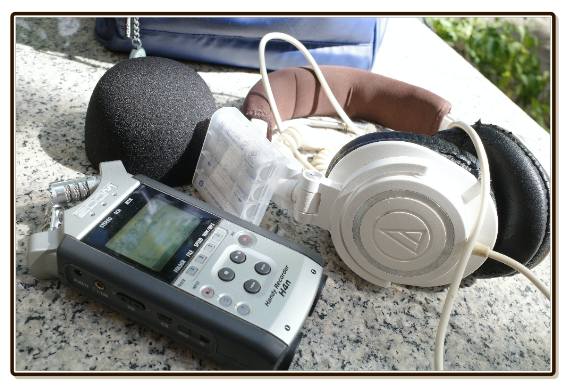
Recording device
This is your smartphone or a portable recorder (digital recorder). Portable recorder means a microphone with battery and memory card.
Are you team smartphone or team recorder? Don't listen to gatekeepers sound engineers saying you are not qualified to go record something if you don't have this and that. We are not pros, let's make use of something we already have.
Microphone : Portable recorders have an obvious advantage of better condenser mic and often clearer stereo, or having option to adjust recording angle to be wider, or better polar pattern which determines an area of audio capture.
Standby Monitoring : In portable recorder, often you can audition the scene with headphone first by pressing record once to enter standby mode. Pressing record again will make it actually start recording.
This is great as you can hear closer to what the players will hear in-game, you can wear a headphone, then walk around scanning for interesting sounds. (Which updates live depending on the direction/orientation you point your device to.) If you just listen to the real world with your ears, often that is way better than what would be captured.
In smartphone record app (at least in iOS, not sure about Android), there is no standby. Even if you connect a headphone and listen while it is recording you can't hear anything. You can only hear the result after the file is saved. This gets annoying when it often costs you 2x time for each recording because you want to check out the file, and while you do so out there in the field it is not fun. (e.g. There is zero cover while you are using smartphone under direct sun, with screen barely visible.)
Battery : Smartphones has generally better battery life. You may need spare batteries for portable recorders. Also, power banks for smartphones are more convenient should it really run out of juice since you can plug in while recording.
Weight and size : Smartphones are more lightweight and small. Portable recorders are lightweight too, but not small. Not to the point that you can tuck in your pants pocket. And also the condenser recording head is fragile, begging to be snapped apart if you are not careful. This matters because you will be changing location often. The more you can walk around with both hands free, the better. Recorder like Zoom H1n can get close to smartphone in terms of mobility and it has some protection around the mic.
Power-on time : Smartphone wins because it is already on and is fast to switch to recorder app. Portable recorder has an unusual trait that start up time increases depending on how large your memory card inserted. (Deleting/formatting is also taking very long time depending on audio content.) Because of this, having small SD Card is actually advantageous sometimes. Fast power-on help you adapt to sudden situation. Usually I was so unlucky that on an instant I fold my tripod and turn off the recorder in order to change to better location, the sounds I want came!
Naming the clip : This one is likely neglected until you actually try recording something. With portable recorder, you get file name like
STM-001,STM-002, and so on. You will want to name it roughly so you don't have to listen again what is what hours later when you are back to your room. But there is no touchscreen keyboard in portable recorders. You must move the cursor left and right, then use scroll wheel to cycle A-Z for each character! There is even no delete key in my recorder, I must scroll the character to empty, as if I am entering high score in arcade games. In the end, I sometimes only change the first character of the file name (e.g.STM-001becomesGTM-001whereGmeans "grass") but often not rename it at all. On smartphones, it is quick to name something right after you finished recording. Alternatively, you can write on a piece of paper or talk about the scene into the recordings.As a compensation, portable recorders can often select folders where new files will go to. (But smartphones usually can't, you have to move it afterwards.) My recorder has 10 folders, sometimes it is easy to remember which folder corresponds to what in that recording session. Inside the folder would be several tries of the same topic.
I highly recommend you to learn about Universal Category System (UCS). After visiting that page and go through some of their videos, you can name the clip in a manner that has high compatibility with many more things. Out in the field you may not be able to exactly follow the specs, but try to get it close then perfect them later.
As USB microphone : Most portable recorders can connect to computer via USB and function as a USB microphone or even an audio interface! (i.e. Adds more audio input ports to the computer.) Sometimes you don't go out there to record ambience, it maybe right in your room or somewhere close by where you have your laptop. You can get audio stream right to your audio editing program and you can start experimenting right away bypassing the recorder's SD card. You can start tinkering and validate if the audio is usable or not right away. On the road, it maybe difficult to move around with laptop tethered to your recorder, though.
Smartphones are not as easy to make it to become an extension of a computer. If you are a gamer or a streamer, buying a portable recorder is even more appealing so you can use quality mic in your game/stream session as well. (As opposed to buying a USB microphone that has no battery and memory.) If you are a singer or a guitarist/bassist, recorders that can add servicable XLR or 1/4 inch ports for your computer maybe very useful.
Windshield : It is easier to cover the mic of a portable recorder with a dedicated windshield than finding something to cover little hole of your internal smartphone mic. Wind is generally your enemy.
Record-time effects : It is more common for a dedicated recorder to have built-in effects you can use right at the input. Effects aren't always cheesy, being able to apply effect combined with live monitoring let you "try out the world" without having to imagine it at post-production. Also one of the most popular thing to do at post-production is to EQ out the low ends a bit. Having on-device EQ let you hear that right away would that helps.
Mark : The
.wavfile's header actually can store variety of information including useful markers. Each one has a timestamp. When you are editing the audio, you can see these marks visually. Sometimes you walk into the mic just to reposition it a bit. Instead of stopping and starting a new recording, you can quickly press the "mark" button after you are done with your adjustment to keep them in the same file. Usually smartphone apps wouldn't have this functionality. Note that pressing the button on device will cause unwanted noise in the recording, unless you use some kind of remote control. Though, personally I think looking at spectogram is informative enough to not needing any marks on the audio for the most cases.GPS : Smartphone apps is better at automatically tagging coordinates to the recordings as the feature is innate to the phone. Many dedicated camera needs to be tethered to the phone in order to obtain coordinates at the same time as taking the picture, as an example how sought-after this feature is for the non-phone devices.
Seeking and editing : Phone with touch screen maybe quicker to preview, seek to an exact spot visually, and even trimming up a bit. For dedicated recorder, you would have to do it after you get back home. It will be quite clunky on the recorder's limited screen.
Don't overbuy the recorder
I like portable recorders from Zoom. I have the oldest version of H4n which was long discontinued. But if I could turn back time, I would get the entry level H1 (now H1n) because it is likely more than enough for my game and is very slim. At that time I thought I better have more ports and functions (for almost double the price), "just in case".
I had never really used my H4n to the fullest of its provided ports, and it is so fat in my backpack! The arching plastic over H1n's mic even allows you to be quick to put the mic back (gently) inside your backpack and get moving. My H4n has no protection and would always need to return to its case, and it also need the windshield removed to fit in the case. Judging from my use case right now, the H1n is better than H4n. This obese H4n is also making me not want to include it in casual trips, which I am supposed to as a field recording amateur in-training.
Wind protection
Just in case you missed it in the previous section. Unless your sounds are indoor, wind screen likely make everything better. When condenser mics got hit by wind, it record sounds like you rub on it. Not what you want in the game.
The "wind sound" is the thing getting blown by wind, not the wind itself. If you blocks the (real) wind with the black foam/furry dead cat, of course it won't make the "wind sound" disappear, only make it even clearer.
There are all-purpose one and one made to fit a specific model. One thing to look out for is that when you use tripod as arm extension, it is more likely for loose windscreen to be shaken off and drop down. It's game over if you reach for waterfall and it fell down, so secure fit is quite important here. My black foam is loose (it is the official one too!), and sometimes when I got lazy I cycling away from the previous site while carrying fully extended tripod with the recorder stuck on the stick. When I look at it again, the windshield already fell down somewhere on the road... it is so annoying.
Headphone
Used to check your recording, or to audition if your device could enter standby mode.
Recorder with stand-by monitoring, a headphone, and a tripod, is a combo that opens you to a new world. It allows you to listen from unfamilliar angle than your usual ears, as if you are a bird. It will be difficult to imagine how things sounds at weird position without wearing a headphone.
If you use your everyday wired earbud that you used with your smartphone, the problem is not sound quality but rather cable's length. When you use a tripod the device will be further away from you. Buying 3.5mm (1/8 inch, AUX) extension cable (male-female) maybe a good idea. Be careful of tripping your cable if terrain is difficult, like around a waterfall.
Also avoid extensible spring cable, as when you extend the device further away from you, tension from spring can be enough to twist the device to different angle than planned.
Protection on you
Many generic game sounds requires going into area with tall grass or to get close to trees that aren't so close to the road. In that moment, you will wish you are wearing jeans though the weather maybe hot. In my opinion covering your legs is more important than arms, as you don't often look down or want to care what's below you.
Bring a mosquito/bug repellant spray and buff yourself. You will be standing still or moving slowly a lot, which make you an easy target for bugs.
You should have a mask equipped already in this trying times. It is required when you are going to get sounds from smelly location like sewers, or dusty location like abandoned buildings. Choose the one that can hang on your neck, your hand slots will be in demand.
Cap is useful for standing still under direct sun waiting for something. If your sound requires rain, of course you have to cover your recorder.
Mobility/rations
Interference and disappointments can occur just about anywhere. Having bike or car will give you mobility to change location.
Similar to photographers, backpack and potentially more bags around your waist/body is helpful to quickly tear down everything and move. I usually use only backpacks before, but when recording I wish I had crossbody bag so it is in the front of me. For microphone without protection around its head, you will need space in the bag for the empty plastic case while you are recording, and also inversely for the windshield while you store the mic in the case in the bag, which you must now remove the windshield to get it in the case. Windsield especially black foam one can take quite some space unless you deform it, which may permanently change the fit to be looser.
Sometimes there is no other way than wait for stars to align. (for everything but the thing you want to quiet down) So maybe also bring water/snacks with you. Recording audio is unexpectedly campy sometimes.
Tripod
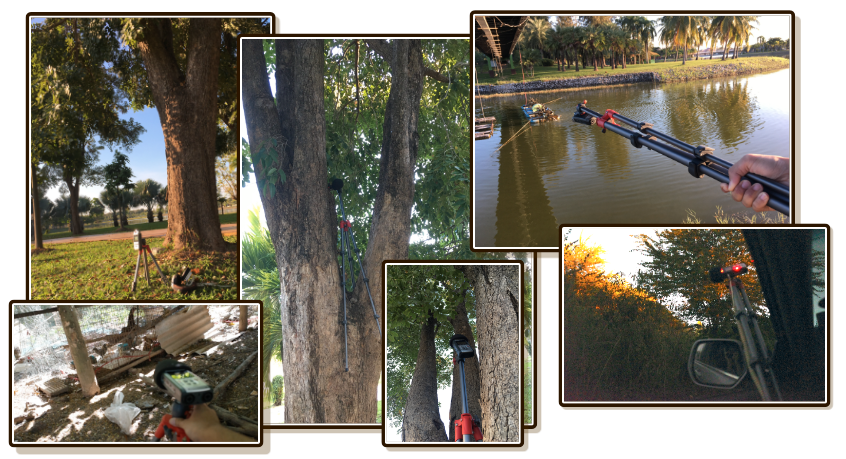
In photography, you need a tripod for tasks such as long exposure shots. In field recording you may think that a little hand movement changing the recording angle won't matter. Maybe! But there are many more useful things that you get from having a tripod.
- Holding angle : If you want something up the tree, then you must continue to point up the tree. It can get tiring after a while especially when there are many obstacles and you are waiting for specific timing (the wind must not be blowing while the bird make noises, etc.).
- Get out of the scene : You are not Snow White, birds are not going to come singing in circle around you if you are there together with the microphone. Increase the chance of getting natural sounds by leaving the device there and get out of the scene.
- Monitor from a far : Sometimes a chance of some specific sound occuring is so rare you rather go sit somewhere far away where you can still see the microphone. Also useful when the place where you want the microphone to be is difficult for human, such as in the middle of shallow river, or in tall grass full of mosquitoes.
- Increase reach : You can put the legs together making it a monopod then hold the leg so your microphone can reach places as if you can float in mid-air. After you have your recorder on a stick, you will immediately notice you don't want to recording near your body in 90% of circumstances! You will want to poke it in all sorts of places. Unlike photography, the "framing" is much more lenient but the position become much more important. Having a stick let you find new sounds or get cleaner sounds.
- Lever : When your recorder turns into a stick, you gain an ability to make it works like a lever. Place the middle of extended legs somewhere like on the tree or over concrete wall as a fulcrum point, put force down on your side, it will get the recorder side up high and quite steady not losing to having enough surface to use a tripod in usual way. Often "the other side" has interesting sound but you can't get there, now you can! It also works really well if you are in a car. You can lower the door glass a bit and lever on the edge. You can drive around and scan for interesting sounds.
- Self-performing : If you are recording your own footsteps or you are going to shake the tree, then without friends you will need a tripod to get the sound from the correct position. (Usually is not the position you are performing the sounds.)
- Roll, pitch, yaw : When you extend your recorder to be in unfamiliar position than you used to hear with your own ear, it can be mind blowing how sound changes when you just change the orientation. It is not just position! By holding the tripod, you can experiement with the orientation easily than twisting your own arms which aren't as flexible because of human's joints. Many times when I roll around searching for satisfactory stereo image coming from my headphone, the resulting orientation doesn't look like what I imagined at all. (But if it sounds good, then record it!)
Notable tripod specs
Quick Release : In photography it is great to be able to quickly detach the device without screwing many rounds to quickly get something sudden with faster shutter speed. In field recording I found this less important, you can quickly grab the tripod's leg and yank it in general direction.
Weight : Favor lighter one than stable but heavier one. Unlike photography that you plant a tripod to get steady shot, you will be swinging tripod as a stick a lot more to find new sounds or even do so while recording. If you are using handy portable recorder, don't add the weight back by using an overkill tripod. If an unassuming selfie stick can hold your recorder, I think that is a really good choice!
Optimize so it is the flimsiest possible for your device while able to take some light beating. It will pay off when you are deep in difficult spots. For example, you may need to scale some slippery big rocks in order to get to where you can hear the waterfall better with tripod in one hand, the other hand trying to grab something stable. What kind of tripod would you rather have at that situation?
Also features such as able to flip the center column upside-down to take low angle photo is rarely needed for amateurs like us. Tripods with a lot of special features tends to be heavy too.
Head gimbal : It is important that it can also rotate to face directly up instead of just forward. Up is useful for capturing sounds on the tree. Plus when you are holding tripod on its legs and point forward, that "up" is now the forward. Lighter tripod usually can face up by using a single little groove. I think that is enough if a more flexible gimbal means increasing the weight of tripod.
Folded size : Huge difference in mobility if the completely folded tripod can fit in your backpack. I like that more than having to carry a dedicated longer bag for just the tripod. Backpack with unified slot is at advantage here, usually the problem is the Z axis bulge it adds to the closed backpack rather than the length. You may choose either flimsier tripod, or rugged but hand-held only (no extensible legs) mini tripods such as the octopus, something similar to Manfrotto Pixi, or even a selfie stick if it could take the weight of your recorder.
Locking mechanism : Locks on the legs are generally the twist type and strap type. I think the strap type is better for speedy setup and teardown. I like the one where you can unlock and extend the center column without extending any legs. You get a big chunk of legs to hold onto while also extending the reach.
Obstacles
This is probably the biggest takeaway I experienced. Always imagine possible interferences when you are considering recording location instead of just matching the sound you want with a location. This is an equivalent of milky way photographer having to check all sorts of things before heading out.
Imagine you are already there, what are you hearing? Usually we remembered just the visual, not the sounds. Try harder to recall the sound.
For example if I want a river ambience, and I go to an obviously well-known river around here, I would also get boat engines from tourists rendering it impossible to get the recording I want.
Vehicles
You may not notice this until you start recording ambiences. It is unbelievable that man-made things like vehicles are EVERYWHERE.
Your notion of "busy" will change forever. I thought the street in front of my house isn't busy. I have worked at home here plenty of times with good flow state, so I thought I could record nice windy tree right from my home.
When I actually start, the cars and motorcycles appears to interfere with my recording in lock step as if intentionally messing with me. (The next one had to come as the previous one fades out!) Can't even get 10 seconds long of wind that have to come at the same time as where there is no vehicles.
I asked my family if they think this street is busy, they all said no. But then I point out there is no more than 10 seconds that there is no vehicles, they are all surprised that it is true and how unbothered we had become.
Even when I thought everything had finally settled down at the same time, there is siren of emergency bus, someone coughing, notification chime from nearby noodle shop because someone ordered a delivery. The mic picks everything up. It is like fighting Alatreon and thinking how the heck can I get the job done if there is barely any opening.
"Unusable" period is related to the shape of road. The longer the road, the bigger unusable period you get when any single motorcycle comes into the same straight line as you. If the road is long enough, they will keep the interruption chain active and you will never get to record anything. It may help to choose a section of alley where you get fewest staight line to vehicles as possible. (i.e. standing right at the intersection or corner is more prone to getting vehicles. Think you are playing Bomberman and you don't want to die.)
The world is busier than we thought. We are just so used to civilization. The recorder made me realize it is very difficult to get purely just the sound I want. It is a good idea to take time and go somewhere unconventional. You will feel that some place is unordinary. That place is great for recording.
It applies to even not so natural location. I once went into emergency fire exit stairs but go up instead of down. It leads me into corridor that is clearly neglected for very long time. (so dusty, please bring masks) There are all sorts of interesting and usable sounds to be recorded around there that I would not notice if I am still in the "normal world".
Moreover, you may need only a short opening if you have something like Tiny Ambience. If not for Looping Clip layer, you maybe able to apply your recordings for One Shot Program or Timeline layer mode.
Construction
Not losing to vehicles are construction sounds. A spinning concrete truck (dunno what that is called) or some kind of pumping system can add low end hums, and various hand power tools can add ear-shattering high ends. Turns out people are building something everywhere.
After I escaped from pneumatic drill, someone is splitting metal in half with circular saw. All these are likely "unnatural" even if you are recording urban ambiences for busy town in your game.
I was once up high on the mountain and thought I could get some nice birds. But construction cranes comes from the city way down below! They won't stop until it's dark. And when it's dark I would get crickets instead of birds.
Wind
Wind is romantic when you feel it because it feels good and the receptor of your ears is way deep inside. But for microphones, wind will "boom" the mic producing very synthetic low end sound that doesn't sound like wind you are expecting to hear.
The "wind sound" players wanted to hear is actually sound of the thing getting blown by wind, not the wind itself. Going to the beach without windscreen is not a good idea. You would get only booms! In a pinch, you can cover the smartphone under your shirt.
Therefore we must protect the microphone from wind with a windscreen (the black foam). The grey furry one is called "dead cat".
Dogs
When you attempt to go to obscure place you may encounter bored dogs. Unlike dogs on main street, they will be so excited and likely not stop barking you. It can also triggers chain reaction of the other dogs. Then you have to move location rather than waiting for them to go away.
These places includes alley with private residences that you thought is perfect for recording, but if dogs inside those house see you they will interrupt the recording. Temples also took in a lot of stray dogs. Your slow movement while recording is the perfect description of "suspicious" for them.
There are also faraway dogs especially if you are recording at night. On midnight where people all go to sleep, the remaning ememy is the dog. And because everything else are quiet, now you can hear dogs barking or howling from kilometers away. The frequency where they occupied is on the high zone so it is not easy to remove from the sound you want either. You will have to be patient and wait for good bit.
If you are hunting field recordings by car in secluded area there are a lot of dormant dogs laying around. It seems that as long as you don't get down, they will not pay attention to you. A lot of cars passed by, but only a few people comes out. So only a car will not interest them. Just stay in the car and use a tripod as your extension arm and get the ambience on the roadside you want.
Smartphones
It doesn't take multiple humans to ruin your ambience. Everyone's Line or Messenger is repeatedly calling for attention. Maybe there are someone playing re-run comedy show or radio on their smartphone speaker. Ear-catching SFXs of those shows will get into your recording.
Smartphones are very loud nowadays. And even if you are intentionally recording crowd or cafe ambiences, if someone among the crowd is blasting the phone's speaker, it produces generally undesirable/unloopable ambience as it puts in the branding of those messaging applications in your game, breaking the 4th wall.
Watch out for smartphones sounds while recording, continue capturing sound until you get long enough moment without any smartphones.
Getting away from noises
Generic sounds usable in many games like footsteps on grass, wind blowing trees, or birds, can be found just about anywhere. The problem is the location is not isolated enough to record.
Obvious thinking is to travel far from town as much as possible. But not many have that luxury. Instead, I have some tips to discover good recording location near you.
Go perpendicular to the main road
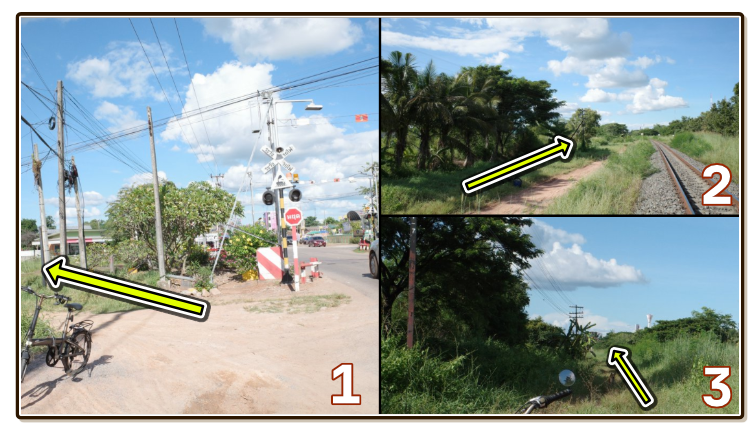
Noise will follow you as long as you are still traveling along the main road. Try go into smaller road or an alley, until the road looks more and more inconvenient.
Sometimes it feels like you crossed map boundary from world map into a specific location, the noises stopped following you. However careful that you may found more bored dogs that are easy to get excited.
Peaceful locations
There are sanctuary zones in your town that are naturally peaceful. It is not like I specifically wanted an ambience of temple, but many generic ambiences could be obtained there.
- They are deep, providing required distance from busy road where all sorts of interruptions occurs without requiring to get out of town for real.
- People in these locations are "better". Parks in my town sometimes has more people than roadside, but they are all chilling!
- Sometimes grasses or trees are "better" inside these location because animals are more likely to be settled down and have bigger family. We can get more varied sounds.
Some examples :
- School on weekend : School is naturally deep, on weekend there is not much reason to come so it shields people from coming in naturally. Unless cheerleading squad is rehearsing inside. Kindergarten-only school often has less motorcycles coming inside. And larger school could be more insulated from outer roads at the center.
- Library : Libraries may not be as synonymous to quiet as you thought on crowded day. But area around the building is often better than standard in quietness.
- Housing estates / Living condominium : There is no reason to come inside the gate unless to get out of home or come back home, so it is pretty peaceful during the day. For more prestigious condominium or estates you may have trouble getting past the gate without actually living there. But I generally have no trouble walking in or going in by bike, too small for the security guards to care.
- Temple / Church : These places are peaceful by protocol, it is supposed to be peaceful. You may still encounter some other problems such as construction workers, or harmless wind chimes that are now harmful to your recordings.
- Public park : Find one where you can get into the center, not the one that is simply around body of water since that won't separate you enough from traffic. But since there is no buildings to shield you from around the park, I found some loud sound like sirens got through to the park just as easy as outside.
- Public toilet : Here's my favorite cheat. In any seemingly busy place, just find public toilet of that place. The location is intentionally deep inside enough that maybe you can get clean recordings. But you are limited to what's around the toilet which maybe not that interesting.
Look for walls
I went to school on weekend which no one was coming. Surprisingly, some schools aren't effective in removing noises from road around it despite standing pretty further inside the school.
It is because building placements are different. A problematic school has "U" layout which if I stand right at the hollowed center, I still get full noises from road. As soon as I stand behind some buildings it gets way better.
This can be applied to something in smaller scale such as behind a big tree. It can block out sounds coming from the other way. Sounds are more directional on the mic than you ears.
Do it synthetically
I once "performed" earthquake and wind ambience for a game I worked for right in my room by beatboxing into the mic. This way the recording is very clean as you are alone in the room.
Some other examples includes gently shaking some small plants you own in order to get wind blowing ambiences, or recording subtle reverbs in the toilet to use in hall location in the game. I once tried to get an authentic ambience inside ceremony building of a church, on a day without any ceremony. But it is still difficult to avoid all traffic sounds from miles away or someone walking by and check out what am I doing.
Just wait
I understand the frustration, but don't get pissed off so fast when you have just arrived at the location and find it unworkable! Sometimes the construction workers can suddenly stop working for a bigger period of time where you can take advantage.
Watch your input meters
Meters on your screen aren't just for show how loud it currently is. There is a maximum point you must not go over.
Adjust input volume so the meters aren't going over the maximum. Make sure you don't confuse that with "monitoring volume" as well. Anything over the maximum got squared off, you are instead recording square wave data. It is better to record quieter and boost up the volume later at home.
Recording it too quiet can also be problematic as when you boost it up, you also bring up the noise floor as well. But software nowadays can fix the noise. Actually, software nowadays can even "de-clip" to regenerate the clipped off audio that wasn't captured in the first place. It's like magic...
Talk into the recording
The first thing after pressing record is to say verbally what you are going to record. It will be fast to recall what you recorded at editing stage, combined with looking at the spectogram.
This applies also to when you decided to do something differently mid-recording! For example in this clip that I recorded my own footsteps. Unexpectedly I don't have time to edit it until 5 days later. Now at the computer screen, I am not sure what I was thinking at this pause. The footsteps character definitely changed after that pause, but because of what? Step harder? Step with feet dragged a little? It wouldn't be a problem if I said it out loud.
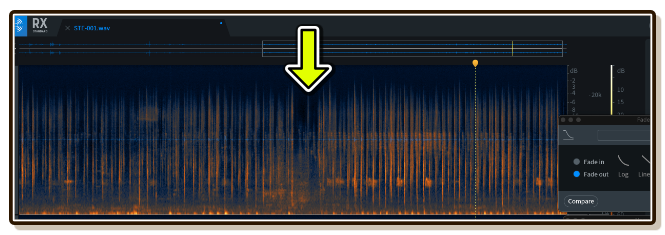
The only thing difficult about this is you may feel it is cringey to say something alone in the field, and even cringier when you listen to your own voice later. I am a sad, hikikomori game developer, who don't sing and stay at the corner when my friend dragged me to karaoke, so I know how that felt. But trust me, it worth a lot on editing.
Equivalent ambiences
If you need an ambience for rivers in your game, you may not literally need to go to river. Instead, miniature waterfall in front of someone's house is exactly simulating the same physics and maybe usable.
If you want some ambience for your server room stage where the mastermind is waiting to meet your protagonist, you may instead find some big electrical poles with similar buzzing sound.
Your fridge's sound maybe chilly enough to be put in your ice cave. Or you can get a volcano's rumbling/earthquake by poking the mic into your own mouth instead of actually going to a volcano/getting hit by an earthquake.
Noise mistakes that are your fault
You should be careful especially when using smartphones where you aren't auditioning while it is recording. You often don't want to become a character inside the ambience together with the birds.
Breath
Your nose is unexpectedly noisy due to how small the holes are, producing high end wheeze periodically. Try breathing gently with widened mouth instead while recording.
Footsteps
You may want to move around to find better location without stopping the recording. This often occurs when you are hunting a certain sound source that is movable like birds.
If you walk normally, sounds recorded while you are walking may not be usable. If that bird comes back while you are walking then it is lost. Instead, try to walk smoothly like tip-toeing to increase usable audio in your recordings. Flippers may increases the chance of it making flipping sound as well.
Device handling
Especially for portable audio recorder, when you adjust your grip it makes very loud hollow/plasticky noises. If you are recording without a tripod, do not adjust your grip. Lock your fingers in the same shape. You can twist your arm or wrist, just don't move your fingers.
When using a tripod, You still have to be careful not moving your fingers since the handling sound transfer through solid substance. But you can get better grip when clenching on tripod legs.
Runny nose/allergies
I am allergic to various dust and viruses that came before the rain. (To the point that I could tell it is raining tomorrow despite the sky is perfectly clear right now.) Sneeze is probably obvious for you, but watch out for runny noses.
It's been like this my whole life. I am so used to it I forgot I constantly making sounds with my nose every 5 seconds. It is revealed when I listen to my recording, ruining almost all of them! Therefore either use a tripod and get away from the mic, or try using mouth to breath for the duration of recording.
Your phone
Turn on do not disturb or something that disables both notification/ringers and vibrations.
Hanging stuff
You can move around gently while recording to adapt to the situation, but make sure you don't have keychains or zippers on your coat or backpack that make noises on every movement with you.
Vary the actions
If your recording requires you or someone as the "performer", like footstep sounds, sound of hand-operated tools, or instruments, you can get infinite variations by change up an action that triggers the sound.
- When stepping on grass, even on the same shoes, you can step harshly or softly, step toe-first or use the whole feet, etc.
- When playing an instrument or operating some mechanical items, you can increase or decrease speed or try hitting or rubbing the object where it was not intended to be used.
Record longer
Usually when you are back at your computer, you wish the recording was longer. You hear all sorts of unwanted sounds that the best available spot isn't quite clean enough. But when you are out in the field, you will think it is enough. It's been 2 minutes!
So if possible, try letting the recording run longer than your instinct telling you. Using a tripod will encourage this as you are not holding the device. Then when you edit and you ended up using later part of the recording you can thank yourself.
Live-mixing stereo balance with orientation
Microphone on your recorder is not only more sensitive than your ears, stereo image tends to be exaggerated/alien due to polar pattern of the mic. Many times when I get back home, some unwanted sounds such as music playing on someone's radio on my left or right (which I didn't notice while recording) exist in the file on far left or far right of 2 channels obtained. When something is mainly only on one channel, it can sounds even more obvious than having it in both. (In making music, composer can just pan some elements off center to both make the center shine and at the same time make that element more audible since it is playing on only one ear.)
In real world listening with my own ear, I had never felt of this "far left/right" sound. The left ear would still be able to pickup and mix even something directly to your right generating noises, leaving you balanced impression.
The microphone's captured stereo maybe disorienting or annoying sometimes because its "ears" aren't the same as yours, with the center stage the most similar to your ear. Other than getting wider microphone more similar to your ear, you can fix this problem by live monitoring the sound with headphone on stand-by mode to hear through its ears.
Then with tripod, it is easy to randomly "search" for balanced stereo by rolling/twisting the device around (keep the same position). More often when you get something that sounds good, the mic's orientation ended up not the way you thought it would produce this good sound.
Record the noise floor too
No matter what you are not going to get a sparkling clean record. If you record birds, they are going to come with a certain noise floor of that location. (Sounds like "zzzzz.." when you pump up the volume)
The problem occurs when you are later trying to slice and dice these birds into programmed shots in One Shot Program mode, or occasionally fade in and out in Timeline mode. If you do not have any Looping Clip playing "nothing" as a base, it will be very obvious that noise floor are coming and going, the "zzzzz.." will be clearly audible because the player can compare it to complete silence!
This is a frequent problem in podcast/interview editing when you try to alter the recorded content, the silence must be filled with the same kind of noise that occurs while the speaker is speaking. This is an expensive feature in program like RX called Ambience Match, that means you should care!
Therefore it is useful to make sure you also get "nothing" in the recording too. I once went to record under a tree with too many birds. When I came home, There is no period longer than 1s that provide me a pure noise floor. If possible, get away from the trees or things containing those birds and find some quieter spots to get the noises.
Also try to always obtain just noise in the same file that you want to remove noise, because clean up software can "learn" that section as an example then apply noise removal for you.
Time
It maybe obvious that forest at day and night is completely different. But there are also special sounds you can hear at only morning or dusk.
Opposite to the sounds you want, also try to think about obstacles that occurs daily.
Park at dusk may not be a good idea because aerobic stage will start pumping the bass to your mic. Or if you want some ambience of peaceful train station then you must not go right in the morning where everyone rushes to work. At midnight, you can get rid of all traffic sounds and you are now free to get the night time insects right at home without having to go to real forest, as maybe the case with day time insects, but you are now prone to getting dog's howling/turf war from the other side of city.
Use weather forecast
It maybe a common sense to check for rain if you want or not want the rain.
But wind is also being forecasted nowadays. This may not be a common sense, but winds are pretty rare when you want it unless you live in naturally windy area such as the beach or mountain.
If you go to public park hoping for breezy tree sounds, then you must check the forecast. Sometimes it is so weird looking at all the trees being dead still when you really want them to move. I didn't pay much attention before how often there is no wind at all for extended period of time.
Fire and forget with a tripod
In some troublesome places with little opening but you still want the audio regardless, you can "camp" with a tripod! Just left it there then go do something else away from the recorder. (If public place, make sure no one can't pick up your tripod and run away!)
After sufficient time had passed you will obtain a large recording (like 10-30 minutes recording!). The trick is to use a spectogram. In troublesome location, you can easily locate a part of audio where there is no problem, inversed from the usual that you can locate where something interesting is happening. Then you just need to look inside each possible spot where it might be usable.
These red rectangles are the shape of cars or motorcycles passing by in front of my house. In games, even a little opening can form a usable loop to run as a background in Looping Clip layer.
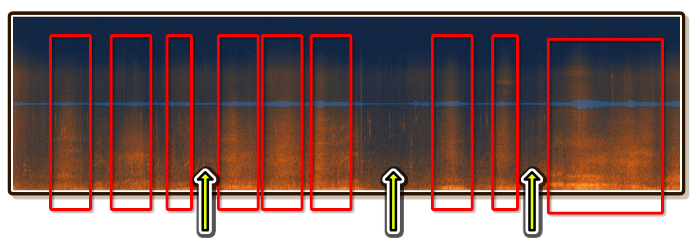
I used this approach to capture wind sound right from my home, but the road in front of my home is mostly busy and it is not guaranteed that when there is no car, the wind is also blowing at that time.
Point to the source
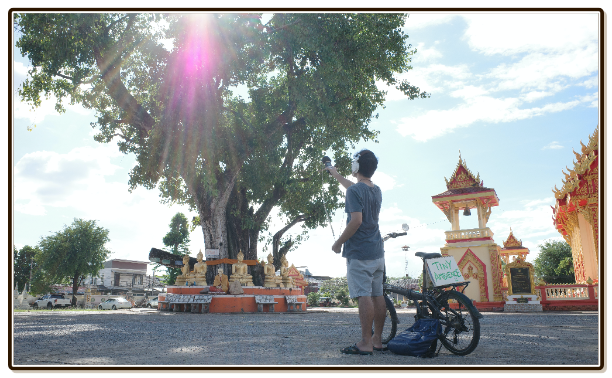
The mic has direction, and so are your ears, but your ears have wider range and are on the side of your head instead of pointing forward. You should point it to the thing you want to get. This sounds obvious but I made mistake of just standing in general area and just press record.
"The source" needs special attention in some cases. For example, you are in countryside and is hearing pleasing symphony of birds around you and want to get it. "Around you" may actually are just the trees. Birds aren't making much noise in mid-air.
You may attempt to close in the tree and point your mic to it to get purer bird sounds. This maybe technically less natural, but you gain flexibility to mix it in the game engine afterwards.
If you are recording wind blowing over rice field, then point to the rice. If you are recording footsteps, then point to your foot.
If your recording device is a smartphone, it gets a bit complicated to know which hole on your phone is a mic. You may test it first by rubbing all over while recording to find out which is the mic.
Forest at night time is magical! Let's talk about this more.
Locality
There are many kind of ambiences that we underestimated their locality.
It is not until I work on this plugin and actually go out to record night time ambience that I noticed this. If I sit still in the middle of forest at night, you know how that sounds, right? Shimmering symphony of insects with a few stand out ones that you could hear better but in more sparse period.
But when I walk around, I notice that the balance has changed. All the shimmering sounds that was once cohesive is now differentiable when you try to walk around almost like you could "debug" it. (It also helps turning around your head to find where is the source of the sounds you like.)
That is (probably) because same kind of bugs stays together in one tree. When you get closer to one tree you are further from others. And now you know which bugs you want came from which tree. It is quite fun trying to fade in and fade out the bugs like you have a MIDI controller knob just by walking around!
It applies to other kind of sampling you are going to do. For example a water mill. You may stand in front of it and point your mic towards it and recorded a "water mill" ambience. But a better representation would be record where the wheel hits water, and separately around the axis where it makes more woody sounds. If you are worried about increased space requirement for having more sounds per 1 thing like this, remember that with many layers shorter clips will sounds more natural because they are syncopated with the others. And there are many tools in Tiny Ambience that let you manipulate shorter clips over time to "recover" back the length.
What does this teaches us? Actually everything is local. The "2D" settings in Unity is to simulate the sound that was once local but reflected and traveled in the environment so many times you don't want to care anymore and just want it to come straight to your left and right ear.
(Also stereo sound source/clip isn't real, it is stereo because you have 2 ears. Bugs don't know how to emit audio in 2 separate channels...)
Room ambience
Closed room or hall of a building that has nothing going on is in fact making sound. Room has a shape that produce reverb which lasts very long time and you are hearing that. This complex character is sometimes captured as an impulse response.
Try recording "nothing" inside different locations and listen to them, it is as if you are standing there. Your room feels like home even when you close your eyes probably because you remembered the ambience, compared to hotel room which feels more special. Games can also benefit from this realism. Try always adding ambiences as much as you can even in non-natural location.
Thinking about post-processing
In post-production, effects can alter your recordings. But they are important to keep in mind while recording too, not just when you are finally back in your room. Because :
- They make something impossible becomes possible.
- You don't want to go out to the field again to fix your recordings. You want to record only fixable recordings.
- You may go to places where you normally won't go knowing that effects can make use of the sounds.
EQ
In post-production, Equalizer (EQ) can draw a curve to boost or cut desired frequencies. This is important to keep in mind when recording because that make something impossible becomes possible!
For example, I was trying to record some crickets in the field. But this field is too close to busy road, no matter how long I wait there is no openings that I could get just the crickets more than 3 seconds.
But I know that the cars sounds bassy, and the crickets occupied mostly the higher end of the spectrum. Knowing that I could just EQ to erase the cars away later means right now I can ignore the cars and just focus on the crickets.
Gate
For example you wanted howling dog for your ambience. But it is impossible to find a dog that would howl right into your mic. It is unavoidable that it will come with other ambiences as well, for example, at night time. But your game wants some howling at day time. What to do?
With Gate effect you can get a cleaner dog! Imagine you manually holding the volume knob in order to turn it down right the howl is over and let the volume be normal again when howling is coming again. That would help the in-between of howls be clean silence. (It can't do anything to the night ambience that are inside the howls however, but those are less noticable.)
Gate can do this automatically by setting thresholds. And also can do so smoothly instead of just abruptly turning on and off the volume.
Compressor
Some machienery sound may have interval "hits" that hits too hard to your liking. But you found out that lowering the overall volume will make the other little interesting sounds disappear. It would be great if we can lower just the high spikes in the clip.
Difference of highs and lows inside the same clip is called dynamics. A recording of symphony concert has higher dynamics compared to popular music.
Compressor is a dynamics processing effect. Basically it is a volume knob/EQ with if. If volume level is not high enough, do nothing. When it is higher than threshold you specified, it can do something like lower the volume just temporarily or lower only some frequencies. This "temporarily" you need to tune it so it is exactly the same length as the thing you want to slam down.
Spectral editing
This is an equivalent of surgery in audio editing. Or maybe Photoshop of audio. It works like EQ, you can remove a certain frequency.
But EQ always stays on, what if you just want to remove the cars but not some other sounds that follows that have the same frequency as cars? Turning on and off the EQ at the right time is possible but is a hard work when there are many things that you want and many things that you don't want, all with overlapping frequency they occupied.
Normally you see audio rendered in 2D : The waveform in time and height represents how loud it is. What if we render it in 3D where horizontal is time as usual, but vertical is all the frequencies instead of volume, then use color as the 3rd dimension to show how intense each frequency is?
Now you can really "see" the cars, see the birds, see everything right in your eyes instead of having to listen to the audio! But these tools goes an another level by giving you an eraser so you can just erase the cars you see. Erase and test listening to it if those were really cars or not.
I personally recommends iZotope RX Standard/Advanced for this task. Note that the Elements version can't do spectral editing. They always have a deal going on so it is best to go for a deal. (But often the deals are for Elements version though.)